Desktop-Style Tools & Business Applications
Some work happens at a desk, on a big screen, with a keyboard — service counters, back offices, reception desks, warehouses. I build desktop-style tools and internal business applications for exactly these settings: dense, fast, keyboard-friendly interfaces on modern web technology, running in the browser, as an installed app window, or on a locked-down kiosk machine.
Who this is for
This is for businesses whose daily operations run through a screen at a fixed workstation: a workshop managing work orders at the counter, a facility handling check-ins at reception, an office processing records all day. Often the current "system" is an aging Windows program nobody can update, or an Excel file three people fight over. A desktop-style web application replaces that with something faster, multi-user, and permanently up to date — without changing how the work physically happens at the desk.
What can be built
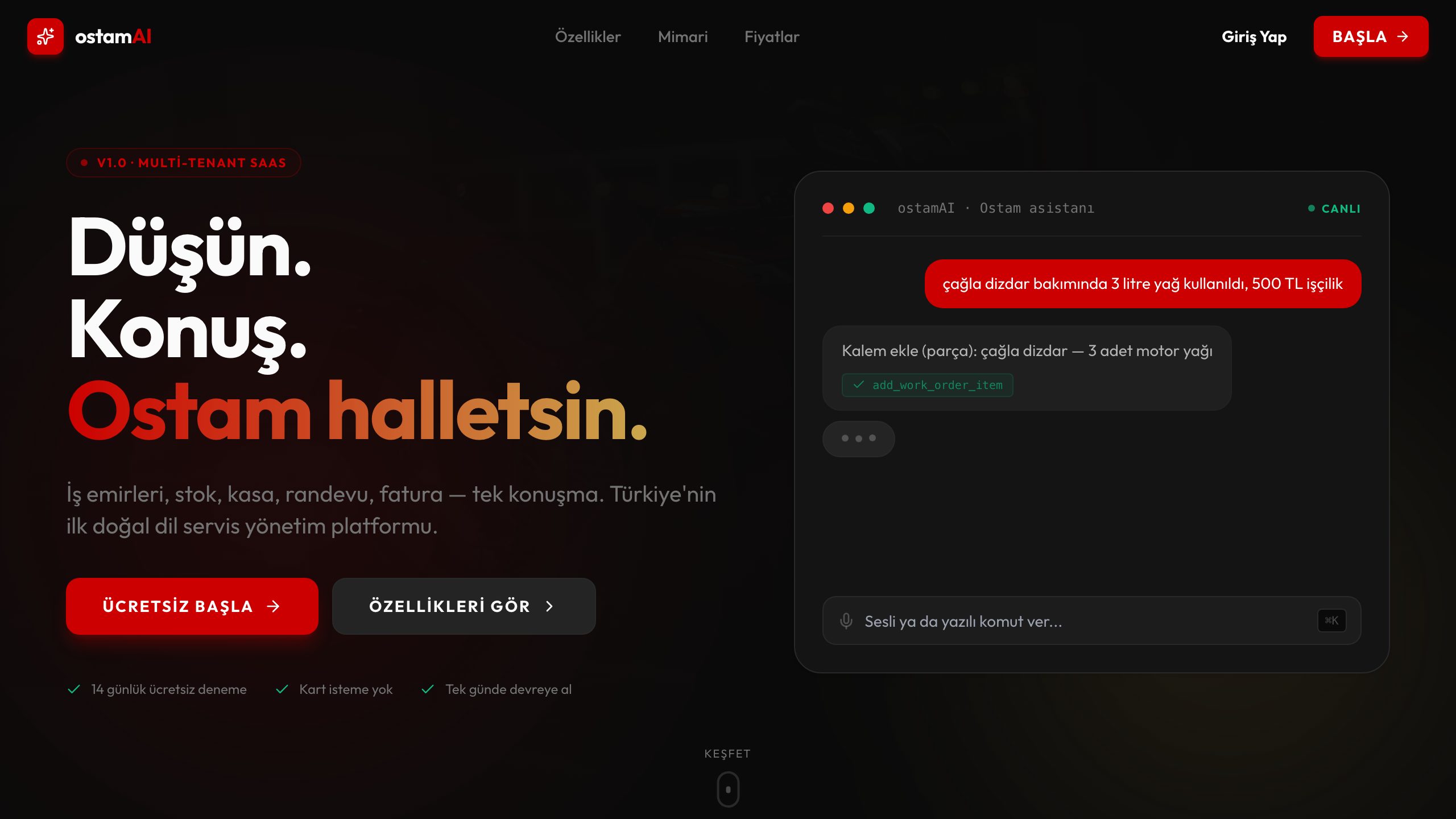
OstamAI is the clearest example from my own work: a full workshop management platform — work orders, customer and vehicle records, service history — used at the counter all day, every day. The same pattern extends to inventory and order tools, booking desks, member check-in stations, and kiosk-style apps where the machine runs one application full-screen and nothing else. Dense data tables, fast search, barcode-scanner input, and printing flows are all part of this territory.
- →Work-order and service management at the counter
- →Inventory, order and stock-count tools
- →Reception, check-in and booking desks
- →Kiosk-style full-screen single-purpose apps
- →Record-keeping systems with search, filters and printing
Why web technology for desktop work
A web-based tool gives you everything the old desktop program never could: every workstation always runs the latest version, new machines need only a browser, several people work in the same data simultaneously, and the owner can check in from home or a phone. When a project genuinely needs a standalone window, tray presence, or tighter OS integration, Electron- or Tauri-style packaging is an option when the project fits — but I do not pretend to ship native desktop software; the honest framing is desktop-style tools built on a web core.
Built for the desk: speed, keyboard, density
Desk software has different rules than consumer apps. Operators use it eight hours a day, so every extra click compounds into real cost. I design these tools around keyboard-first workflows, instant search, dense but readable tables, and screens that match the actual sequence of the work. Roles and permissions decide who sees and edits what; every action is attributable. The backend is the same proven stack as my other work — Node.js, PostgreSQL, Supabase, Docker — so the tool at the counter is as robust as any SaaS product.
Deployment: cloud, local network, or kiosk
Because I run my own Docker-based server infrastructure, deployment adapts to your situation. Most businesses want the tool hosted and reachable from anywhere with proper auth. Some prefer it running on a machine inside their own local network — possible with the same containerized setup. Kiosk deployments lock a workstation to the app in full-screen mode. In every case, backups, monitoring, and updates are part of the arrangement, not an afterthought.
Related Projects
Frequently Asked Questions
+Can you build a kiosk app that runs full-screen on one machine?
Yes. The app runs in kiosk mode — full-screen, no browser chrome, locked to the one application — on a standard PC or touch terminal. Check-in stations, self-service order points, and status display screens all fit this pattern.
+Does the tool support roles and permissions?
Yes — roles are foundational, not an add-on. Operators, managers, and owners each see the screens and actions appropriate to them, enforced at the database level, not just hidden in the UI. Every change is attributable to a user, which matters the day something needs explaining.
+Can it produce reports?
Yes. Daily, weekly, and monthly summaries, filterable histories, and exports to Excel or PDF are standard parts of these builds. Since all your operational data lives in one PostgreSQL database, any question you can phrase can become a report.
+Can it integrate with software we already use?
If your existing software exposes an API or can export data, yes. Common patterns are syncing customers or products from an accounting system, pushing completed orders back, or importing legacy data once at the start. I assess integration feasibility before we commit to it.
+Can it run on our local network instead of the internet?
Yes. The same Dockerized system can run on a machine inside your premises, reachable only from your network. Some businesses combine both: local-first operation with an encrypted off-site backup. We pick the setup that matches your connectivity and privacy needs.
+Is this a real desktop program or a web app?
Honestly: it is a web application built to work like desk software — and that is its strength. It can be installed as an app window and, when the project fits, packaged with Electron- or Tauri-style tooling for a standalone feel. What you give up in low-level OS hooks, you gain in multi-user access, instant updates, and zero per-machine installation pain.